Kids Comic Brush for Procreate: A Practical Guide for Illustrators
In the competitive landscape of children's publishing and digital illustration, the choice of tools often dictates the speed and quality of the final output. For professionals and hobbyists alike, finding a resource that bridges the gap between rough concept art and polished final pieces is a critical workflow milestone. The Kids Comic Brush for Procreate represents exactly this kind of solution. Designed specifically to streamline the creation of comic-style imagery for young audiences, this asset pack offers a curated set of twelve distinct brushes that handle everything from inking to texturing.
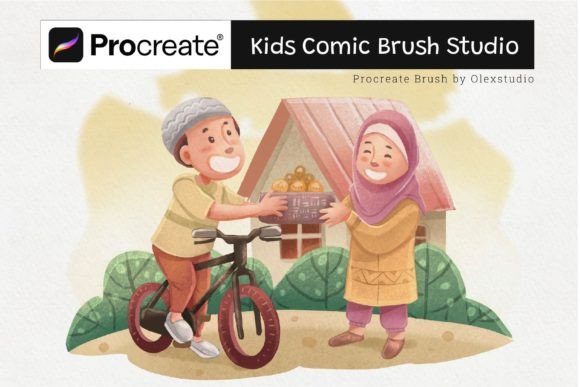
I am Olexs, an artist and illustrator specializing in children's books. Throughout my career, I have navigated the complexities of deadlines, client revisions, and the constant need for stylistic consistency. My journey led me to develop the Kids Comic Brush for Procreate, a tool born from the necessity of creating beautiful, engaging illustrations efficiently. Every illustration you see in my portfolio presentations was created using these specific brushes. They are not just generic assets; they are refined instruments tested in real-world projects to ensure they deliver professional results.
Understanding the Role of Specialized Brushes in Your Workflow
Before diving into technical specifications, it is essential to understand where the Kids Comic Brush for Procreate fits within a broader creative process. Digital illustration is rarely a single action; it is a sequence of decisions involving sketching, refining, coloring, and detailing. Generic default brushes often require excessive configuration or fail to capture the specific aesthetic required for children's comics, which demand clarity, bold lines, and playful textures.
This brush set integrates seamlessly into the middle-to-late stages of your pipeline. While you might use standard pencils for initial ideation, the Kids Comic Brush becomes indispensable during the line art and detailing phases. It allows artists to maintain a consistent visual language across multiple pages or spreads without manually adjusting stroke dynamics for every new element. By standardizing the texture and flow of the ink, the tool reduces cognitive load, allowing creators to focus on composition and storytelling rather than fiddling with engine settings.
The Twelve-Brush System: Versatility and Control
The core value of this package lies in its diversity. The set includes twelve carefully crafted brushes, each designed to produce different effects and details. This variety ensures that a single asset can handle the entire lifecycle of a character or scene. Whether you are drawing the thick, confident outlines of a main character or the subtle, stippled shading of a background element, there is a dedicated brush for the task.
- Line Variation: Several brushes in the set offer dynamic pressure sensitivity, mimicking the natural taper of a traditional pen nib. This is crucial for adding life and movement to static drawings.
- Texturing Tools: Specific brushes introduce organic noise and grain, preventing the "digital plastic" look that can make illustrations feel sterile. These textures add depth and warmth, qualities highly valued in children's literature.
- Detail Enhancers: Smaller, precise brushes allow for fine work such as facial expressions, clothing patterns, and environmental details without breaking the flow of the larger strokes.
Using these twelve brushes together creates a cohesive ecosystem. Because they were developed by someone who understands the end-to-end process of book illustration, they interact predictably. You do not have to worry about one brush overpowering another or clashing in style. This compatibility is a significant factor in maintaining efficiency during tight production schedules.
Integration with Existing Tools and Platforms
A common concern when adopting new digital assets is compatibility. The Kids Comic Brush for Procreate is built natively for the Procreate environment on iPad, ensuring full optimization with Apple Pencil technology. However, its utility extends beyond simple installation. It interacts effectively with other layers and blending modes commonly used in professional workflows.
For instance, when working on a multi-page project, you can create a master layer stack where these brushes are applied consistently. If you utilize photo references or vector shapes imported from other software like Adobe Illustrator, these brushes provide the necessary hand-drawn finish that unifies disparate elements. The workflow remains fluid: import your base shapes, switch to the Kids Comic Brush set, and apply the final ink and texture passes. This hybrid approach saves time while retaining the charm of hand-crafted art.
Preparation and Setup for Maximum Efficiency
To get the most out of the Kids Comic Brush for Procreate, proper preparation is key. Before starting a new project, take a moment to organize your brush library. Group these twelve brushes into a dedicated folder named "Kids Comic Set." This small organizational step prevents time loss during the creative process, as you will not be scrolling through dozens of unrelated tools.
Additionally, consider calibrating your iPad's sensitivity settings to match the brush profiles. Since these brushes are tuned for specific pressure responses, ensuring your device is calibrated correctly will yield the most accurate results. Test each brush on a blank canvas before committing to a final piece. This trial run helps you understand the range of opacity and flow each tool offers, allowing you to build muscle memory for the specific strokes required for your characters and environments.
Practical Implementation in Real-World Projects
The true test of any digital asset is how it performs under the pressure of a deadline. In my own practice, I rely on the Kids Comic Brush for Procreate to accelerate the production of character sheets and page layouts. When a publisher requests rapid iterations, having a reliable set of brushes means I can pivot quickly between styles without losing quality.
Consider a scenario where you are illustrating a storybook spread featuring a busy playground scene. Using standard brushes, you might struggle to keep the lines uniform while varying the thickness for emphasis. With the Kids Comic Brush set, you can select the appropriate line weight brush and execute the scene with confidence. The texture brushes then allow you to add atmospheric depth—perhaps a grainy sky or a rough ground surface—in minutes rather than hours. This efficiency translates directly to business outcomes: faster turnaround times, more capacity for client revisions, and ultimately, higher profitability for freelancers and small studios.
Furthermore, consistency is vital for brand identity in children's media. If you are creating a series of books or educational materials, the visual style must remain stable. These brushes serve as a style guide in themselves. By using the same set of tools for every project in a series, you guarantee that the line quality, texture density, and overall aesthetic remain identical, reinforcing the brand's recognition among readers and parents.
Quality Control and Long-Term Value
Investing in high-quality digital assets is a strategic decision for long-term career growth. The Kids Comic Brush for Procreate is not a temporary fix but a permanent addition to your toolkit. Unlike free, low-resolution brushes that may degrade over time or cause performance issues on newer devices, this set is optimized for longevity and high resolution.
From a quality control perspective, the brushes reduce the likelihood of errors caused by inconsistent stroke behavior. When a brush behaves unpredictably, it forces the artist to spend time correcting mistakes rather than creating. The reliability of this set minimizes those interruptions, leading to cleaner files and fewer revision cycles. For educators teaching digital art, these brushes also provide a standardized method for students to learn comic illustration techniques, ensuring they grasp the fundamentals of line weight and texture application.
Conclusion: Elevating Your Creative Output
The journey from concept to finished illustration is complex, but the right tools can simplify the path. The Kids Comic Brush for Procreate is more than a collection of presets; it is a workflow enhancer designed by an artist who understands the demands of the industry. By integrating these twelve brushes into your routine, you gain access to a versatile, efficient, and consistent method for creating beautiful children's comics.
Whether you are a seasoned professional managing a large catalog or a hobbyist looking to refine your skills, these brushes offer a tangible improvement in both speed and quality. Try them out in your next project and experience the difference a specialized tool can make. As I have found in my own work, the result is not just faster production, but illustrations that truly resonate with their audience, capturing the joy and wonder that define the best children's stories.