2024 Calendar Stamps for Procreate: Your Digital Planning Shortcut
There is a specific kind of satisfaction that comes from opening a fresh digital journal on your iPad and seeing a perfectly structured year waiting for you. For many creative professionals, students, and hobbyists, the blank canvas can be intimidating. The 2024 Calendar Stamps for Procreate are designed to bridge the gap between a blank slate and a fully functional planner in mere seconds. Instead of spending hours drawing grid lines or calculating where the first day of the month falls, these tools allow you to stamp a complete monthly layout instantly.
This resource isn't just about saving time; it's about reclaiming the mental energy needed for actual planning. Whether you are organizing a complex work schedule, tracking personal goals, or simply keeping a daily gratitude log, having a reliable structural foundation makes all the difference. These stamps provide exactly that foundation, tailored specifically for the unique workflow of the Procreate app.
The Anatomy of the Stamp Set
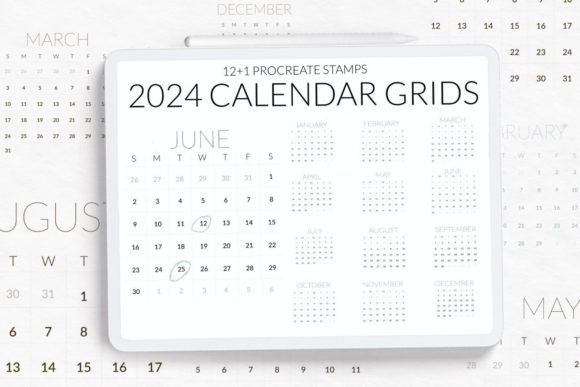
When you download this collection, you are getting a highly efficient system wrapped in a single file. The package includes two distinct types of brushes that work in harmony. First, there is a comprehensive brush containing the entire year at a glance. This is perfect for those who like to see the big picture immediately upon opening their project. It serves as an overview dashboard, allowing you to spot busy months or plan major events across the whole year without flipping through pages.
Second, the set includes twelve individual stamps, one for each month of 2024. A crucial detail for users accustomed to traditional planners is the alignment of these grids. Every single month stamp begins on a Sunday and ends on a Saturday. This consistency is vital for maintaining a coherent weekly rhythm, especially if you are someone who treats Sunday as the start of their week or prefers a uniform visual structure across your journal pages. With these twelve stamps, you can create a dedicated page for every month of the year, ensuring that your digital planner looks professional and organized from day one.
Real-World Scenarios for Everyday Planning
The true value of the 2024 Calendar Stamps for Procreate becomes apparent when you apply them to real-life situations. Consider the busy parent juggling school schedules, extracurricular activities, and family appointments. Instead of fumbling with physical sticky notes or multiple apps, they can open their iPad, select the current month's stamp, and instantly have a clear view of the week ahead. They can then use other Procreate brushes to highlight important dates, add color-coded notes, or sketch out a weekly menu right within the grid.
For the freelancer or remote worker, these stamps serve as a powerful productivity tool. Imagine a graphic designer who needs to track billable hours and client deadlines. By using the monthly stamp, they create a dedicated workspace for each client or project. The grid provides the necessary structure to block out time for deep work, meetings, and administrative tasks. Because the layout is clean and uncluttered, it reduces visual noise, allowing the user to focus entirely on their schedule rather than fighting with the formatting.
Students also find immense utility in this system. During exam season, the ability to visualize the entire month helps in breaking down study goals into manageable chunks. A student can stamp the month, mark exam dates in red, and fill the surrounding days with study sessions. The tactile feel of "stamping" a calendar adds a layer of engagement that typing into a spreadsheet often lacks, making the act of planning feel more intentional and less like a chore.
Customization and Creative Freedom
One of the most compelling aspects of using digital stamps over pre-made templates is the level of customization available. While the 2024 Calendar Stamps for Procreate provide the skeleton, you provide the flesh and blood. Once the grid is stamped onto your canvas, you are free to manipulate the layers. You can change the opacity of the grid lines so they don't interfere with your handwriting. You can add background textures, watercolors, or stickers around the calendar to match your mood or the season.
This flexibility extends to how you use the space. Perhaps you don't need a full month view but want to combine two weeks into one spread for better readability. Or maybe you prefer to use the grid strictly for goal tracking, writing down habits instead of dates. The stamps are neutral enough to adapt to any planning style. Whether you are creating a minimalist bullet journal or a vibrant, artistic scrapbook-style planner, these stamps integrate seamlessly into your existing aesthetic.
Technical Considerations and Compatibility
Before diving in, it is essential to understand the technical requirements to ensure a smooth experience. This brushset is designed exclusively for the Procreate app on iPad. It leverages the advanced features of the software to render crisp, scalable grids that look great regardless of your screen size or zoom level. However, there is a critical version constraint to keep in mind: this brushset requires Procreate version 4.0 or later.
If you are still running an older version of the app, the compressed brushset file will not function correctly. The developers have anticipated this issue for users with legacy devices or those who prefer not to update immediately. If you fall into this category, you do not lose access to the product. The creator offers a solution by preparing individual brush files for each month upon request. By reaching out via email, you can receive separate files that are compatible with older versions, ensuring that everyone can benefit from this planning tool regardless of their specific setup.
It is also worth noting that this is a digital asset intended for personal or commercial use within the context of your own creations. You will receive one brushset file containing all the necessary elements. There are no hidden fees or complicated installation processes. Once imported into Procreate, the brushes appear in your library, ready to be used whenever inspiration strikes or a new month begins.
Who Benefits Most from This Tool?
While anyone with an iPad can use these stamps, certain groups will find them particularly transformative. Journalers who struggle with the "blank page syndrome" will appreciate the immediate structure. The psychological barrier of starting a new month is lowered significantly when the hard work of drawing the grid is already done. Similarly, individuals transitioning from paper planners to digital ones often miss the tactile feel of a printed calendar. These stamps mimic that experience digitally, providing a familiar anchor point in a new medium.
Event planners and wedding coordinators might also find these useful for client-facing presentations. Being able to quickly generate a timeline or a month-by-month breakdown on an iPad during a meeting demonstrates professionalism and organization. The clean lines and standard Sunday-to-Saturday format make it easy for clients to read and understand the proposed schedule without confusion.
Ultimately, the 2024 Calendar Stamps for Procreate are more than just a collection of images; they are a productivity catalyst. They remove the friction of setup, allowing you to spend your time doing what matters most: living your life, achieving your goals, and documenting your journey. Whether you are planning a vacation, managing a business, or simply trying to get your days in order, having a reliable, instant calendar at your fingertips changes the way you interact with time itself.
As you navigate through the year, remember that the best planner is the one you actually use. By simplifying the creation process, these stamps encourage consistency. They turn the daunting task of planning into a quick, enjoyable ritual. So, import the brushset, stamp your January, and watch as your digital journal transforms into a dynamic hub for your year ahead. © Let s Art ♡.