Procreate Beginner’s Brush Set: Your Shortcut to Digital Mastery
There is a specific kind of frustration that hits when you open a new canvas in Procreate. You have the idea, the composition, and the vision, but your digital toolkit feels empty. The default brushes are great for testing, but they often lack the texture, depth, and character needed to bring a professional illustration to life. This is where the Procreate Beginner’s Brush Set steps in. It is not just another collection of files; it is a pack of great brushes which has made my life easy by bridging the gap between novice experimentation and polished creation.
For adults balancing careers, hobbies, and creative ambitions, time is the most valuable resource. Learning to build custom brushes from scratch can take hours of tweaking settings, flow, and grain. The Procreate Beginner’s Brush Set solves this by offering a curated library of 13 brushes that range from basic to advanced. Whether you are a marketer needing quick mockups, an educator creating visual aids, or a hobbyist exploring your artistic side, this set provides the foundational tools you need without the steep learning curve.
Why This Collection Stands Out
The beauty of this brush set lies in its versatility. It avoids the trap of being too niche or overly complex. Instead, it covers the essential ground required for most digital art projects. The inclusion of normal hard and soft brushes ensures you have the standard tools for sketching, inking, and shading. These are the workhorses of any digital artist, allowing for clean lines and smooth gradients that mimic traditional media.
However, the real magic happens when you move beyond the basics. The set includes textured brushes that add grit and realism to your work instantly. If you have ever struggled to make a digital drawing look like it was created on paper, canvas, or stone, these textures provide the necessary surface interaction. They eliminate the "plastic" look that often plagues beginner digital art, giving your pieces an immediate sense of weight and authenticity.
Real-World Applications for Every User
Understanding where and when to use these tools is just as important as having them. Let’s look at how different users can leverage this set in their daily workflows.
For Entrepreneurs and Marketers
In the fast-paced world of marketing, visuals need to be created quickly but still look high-quality. Imagine you are a small business owner preparing a social media campaign for a new eco-friendly product line. You need an image that conveys nature and growth. Instead of hiring a designer or spending days learning complex software, you can use the grass brush and water brush included in the set. With a few strokes, you can create a lush background that feels organic. The building brush allows you to quickly sketch out architectural concepts or cityscapes for urban-themed campaigns, saving you hours of vector tracing.
For Educators and Content Creators
Teachers and bloggers often need to visualize abstract concepts for their audiences. A history teacher explaining ancient civilizations might use the cloud brush and textured brushes to create atmospheric backgrounds for lesson slides. Similarly, a lifestyle blogger writing about travel could use the galaxy brush to illustrate a dreamy night sky over a destination. The ability to generate these assets in-house means your content remains unique and perfectly tailored to your message, rather than relying on generic stock photos.
For Hobbyists and Aspiring Artists
If you are picking up a tablet for the first time, the fear of the blank screen is real. The Procreate Beginner’s Brush Set acts as a safety net. The bonus galaxy brush, for instance, is perfect for experimenting with color blending and opacity without worrying about technical settings. It stirs your creative mind by removing technical barriers, allowing you to focus purely on expression. You can practice layering clouds, painting water effects, or adding texture to landscapes, all while building confidence in your digital skills.
Diving Deeper into the Features
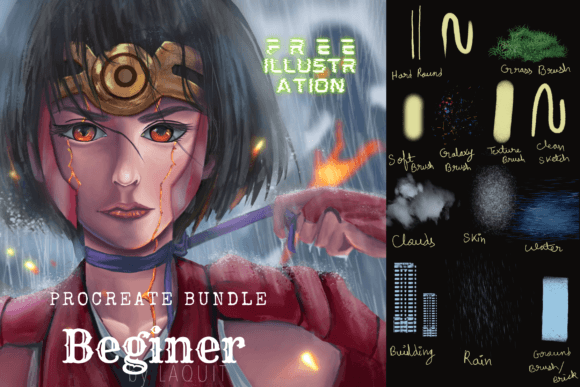
The 13 brushes included in this pack are carefully selected to cover a wide spectrum of artistic needs. Beyond the standard hard and soft options, the specialized brushes offer unique capabilities:
- Grass Brush: Ideal for creating natural environments, borders, or organic patterns. It saves the tedious task of painting individual blades of grass.
- Water Brush: Mimics the fluidity of watercolor, perfect for soft washes, reflections, and blending colors seamlessly.
- Cloud Brush: Creates volumetric, fluffy shapes that are essential for sky paintings and atmospheric effects.
- Building Brush: Helps in constructing structural elements quickly, useful for concept art, architecture sketches, and urban scenes.
- Bonus Galaxy Brush: Adds a touch of whimsy and depth, perfect for sci-fi themes, night skies, or abstract backgrounds.
Each brush is designed to interact naturally with the Procreate engine, responding to pressure and tilt just like a physical tool would. This responsiveness is crucial for maintaining control over your artwork, ensuring that your final output matches your intent.
Learning Resources Included
One of the most underrated aspects of the Procreate Beginner’s Brush Set is the educational component. Along with the brushes, you receive a free illustration JPEG and PSD file to study. This is a game-changer for self-taught artists and professionals alike.
Many people struggle not because they lack talent, but because they don't know how to deconstruct a finished piece. By opening the provided PSD file, you can see exactly how the layers are organized, how the brushes were applied, and how the effects were achieved. You can analyze the brush strokes used for the grass, the blending modes for the galaxy, or the opacity settings for the clouds. This transparency turns the download into a mini-masterclass, allowing you to reverse-engineer professional techniques and apply them to your own work.
What to Consider Before You Start
While this set is incredibly powerful, it is important to approach it with the right mindset. First, ensure your device is compatible and that you have the latest version of Procreate installed to avoid any rendering issues. Second, remember that tools are only as good as the hand wielding them. While the brushes simplify the process, they do not replace the need for practice.
Before diving into a major project, take some time to experiment. Create a test canvas and try each brush with different colors and opacities. See how the grass brush reacts on a dark background versus a light one. Understand the limitations and strengths of the water brush. This exploration phase will help you integrate these tools into your personal workflow more effectively.
Additionally, consider your specific goals. If you are looking for hyper-realistic photo manipulation, this set might serve as a starting point but may require supplementation later. However, for illustrative work, concept design, social media graphics, and educational materials, it offers a robust solution that balances quality with ease of use.
Final Thoughts on Creative Empowerment
The Procreate Beginner’s Brush Set is more than a utility; it is an invitation to create. By providing a comprehensive suite of tools ranging from basic to advanced, it removes the friction that often stops people from pursuing their creative ideas. Whether you are a freelancer delivering a client project, a blogger enhancing a post, or a parent drawing for your children, this set empowers you to execute your vision with confidence.
In a digital landscape cluttered with overwhelming options, having a reliable, well-curated pack of great brushes which has made my life easy is invaluable. It allows you to focus on what truly matters: your creativity. So, download the set, study the included files, and let the 13 brushes stir your creative minds into action. The only limit now is your imagination.