Woman Portrait Hairstyles Stamps: Elevating Digital Art
In the rapidly evolving landscape of digital illustration, efficiency and creativity often walk hand in hand. For artists working on the iPad with Procreate, finding tools that streamline complex processes without sacrificing artistic integrity is paramount. Enter Woman Portrait Hairstyles Stamps, a specialized resource designed to transform how creators approach character design, fashion illustration, and portrait art. These tools are not merely shortcuts; they are foundational elements that allow for rapid iteration and stylistic consistency in your digital workflow.
The Essence of Doodle-Style Hair Brushes
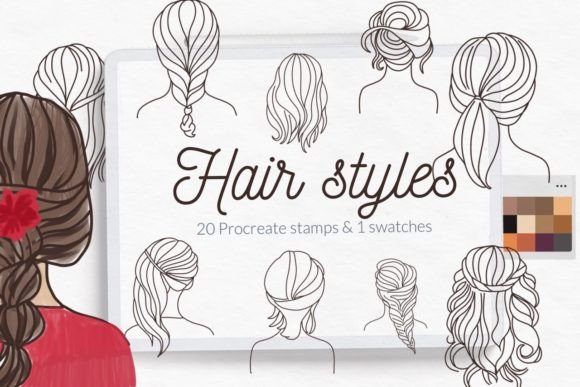
At the heart of this collection lies a unique aesthetic: the doodle hand-drawn style. Unlike hyper-realistic hair brushes that attempt to mimic every individual strand with photographic precision, these Hairstyles stamp brushes woman portrait focus on the essence of form and flow. They capture the whimsical charm of hand-sketching while providing the instant placement benefits of a stamp tool. This approach is particularly valuable for artists who need to convey personality and movement quickly.
The collection includes 20 distinct stamps, each representing a different hairstyle configuration. From loose waves and elegant updos to messy buns and sleek ponytails, the variety ensures that there is a suitable option for almost any character archetype. The "doodle" aspect implies a certain looseness in the lines, which can be incredibly effective for creating illustrations that feel organic and approachable rather than rigid or overly polished.
Why Choose Stamps Over Traditional Brushing?
While traditional painting allows for granular control, it is time-consuming. When designing multiple characters for a storybook, a series of greeting cards, or a wedding invitation suite, spending twenty minutes perfecting a single hairstyle can slow down the entire project. Woman Portrait Hairstyles Stamps solve this by offering pre-rendered assets that can be placed instantly. You can experiment with five different hairstyles on a single face in seconds, deciding on the best fit before committing to coloring or shading.
This method is especially beneficial for minimalistic designs. In minimalism, the line quality defines the image. These stamps provide clean, confident lines that stand out against white space, making them ideal for projects where less is more. The ability to place a complete hairstyle as a single layer also makes editing easier; if you decide the hair color needs to change, you can apply a fill or blend mode to the entire stamp layer instantly.
Practical Applications Across Industries
The versatility of these digital assets extends far beyond personal hobbyist projects. Professionals across various creative sectors can leverage Woman Portrait Hairstyles Stamps to enhance their output and meet tight deadlines.
- Wedding Stationery Design: Creating custom invitations often requires intricate illustrations of the bride and groom. Using these stamps allows designers to quickly draft portraits that match the couple's actual hairstyles, adding a personalized touch to minimalistic wedding invitations.
- Greeting Card Creation: For businesses producing seasonal or occasion-based cards, speed is essential. Artists can mix and match facial expressions with different hairstyles from the set to create a wide range of characters without redrawing the hair from scratch.
- Coloring Pages: The clear, defined lines of the doodle style make these stamps perfect for generating content for adult or children's coloring books. The structure is robust enough to hold up well when printed.
- Fashion Sketching: Fashion illustrators often need to show how a garment looks with different hair volumes. These stamps provide immediate context, allowing the focus to remain on the clothing design.
A Bonus Palette for Cohesive Coloring
To further assist in the coloring process, the package includes 1 color palette specifically curated for Procreate. Color theory is crucial in portrait work, and having a pre-selected swatch file removes the guesswork. This palette is designed to complement the line work of the stamps, ensuring that skin tones and hair colors harmonize beautifully. Whether you are aiming for pastel softness or bold contrast, this bonus tool streamlines the coloring phase, allowing you to maintain a consistent visual language throughout your project.
Additionally, the set comes with a Bonus hair brush for Procreate. While the stamps provide the base shape, this brush allows for fine-tuning. You can use it to add stray flyaway hairs, adjust the texture at the roots, or blend the edges of the stamp into the background. This hybrid approach—combining the speed of stamps with the flexibility of a drawing brush—offers the best of both worlds.
Technical Specifications and Compatibility
Understanding the technical requirements is essential for a smooth user experience. This product is designed exclusively for iPad Procreate. It is important to note that the functionality relies on specific features introduced in recent versions of the app.
Version Requirement: The brushset is optimized for Procreate version 4.1 and later. If you are using Procreate version 4.0 or earlier, the native brushset import feature may not function correctly. However, users with older devices or software versions are not left without options. A manual installation method is available to ensure compatibility.
Installation Guide for Older Versions
If you have an older iPad or are running Procreate version 4.0 or earlier, follow this step-by-step guide to install the Woman Portrait Hairstyles Stamps:
- Download the folder containing the
.brushfiles directly to your iPad's Files app. - Open the downloaded folder and locate the individual
.brushfiles. - Tap and hold one of the files using your finger or Apple Pencil until a menu appears.
- Select Share from the menu options.
- In the Share sheet, look for the option "Open in Procreate." If it is not immediately visible, tap on More.
- Scroll through the list of apps, find Procreate, and toggle it on or click it to open the file.
- Once opened, launch your project in Procreate. Click the brush icon (two dots) at the top right corner of the screen. Your new stamps should now appear in your library.
Alternatively, for a direct import within the app:
- Open Procreate and start a new canvas or collection.
- Navigate to the brush settings and select the Import option.
- Browse to the folder where you saved the download.
- Select the desired brush files and confirm to add them to your library.
Evaluating Suitability for Your Projects
While Woman Portrait Hairstyles Stamps offer significant advantages, they are not a one-size-fits-all solution. It is important to evaluate whether this style aligns with your specific project goals.
Ideal Use Cases: If your project prioritizes speed, stylization, and a hand-drawn aesthetic, these stamps are an excellent choice. They are particularly strong for editorial illustrations, social media graphics, and conceptual sketches where the mood is more important than photorealism.
Considerations: For projects requiring extreme realism, such as cinematic concept art or medical illustrations, the doodle style might lack the necessary detail. In these scenarios, the stamps can serve as a starting point—a rough layout to block out shapes—but will likely require extensive manual refinement to achieve a realistic finish. Additionally, because these are stamps, the perspective is fixed. Rotating a stamp too far might distort the intended look, so they work best when viewed front-on or in slight profile.
Final Thoughts on Creative Efficiency
In the world of digital art, the tools we choose define our workflow. Woman Portrait Hairstyles Stamps represent a thoughtful balance between automation and artistic expression. By providing 20 versatile, hand-drawn options alongside a dedicated color palette and bonus brush, this collection empowers creators to focus on what matters most: the story and the emotion behind the portrait.
Whether you are a professional designer crafting a wedding invitation suite or a hobbyist exploring character design on your iPad, these resources offer a practical way to overcome the tedious aspects of hair rendering. With proper installation and an understanding of their stylistic strengths, you can elevate your Procreate projects, delivering high-quality results with greater ease and confidence. Remember, the goal of these tools is not to replace your creativity but to free it from repetitive tasks, allowing you to spend more time bringing your unique vision to life.
© Let's Art ♡ – Empowering creators with intuitive digital tools.