Vector Watercolor Brush Collections: An Evaluation for Digital Artists
In the realm of digital illustration and graphic design, the pursuit of organic texture often leads artists to explore tools that bridge the gap between traditional media and vector precision. Vector Watercolor Brush Collections represent a specific category of assets designed to emulate the fluidity, transparency, and spontaneity of watercolor painting within a scalable vector environment. These collections typically offer a suite of pre-defined brushes, often numbering in the hundreds, which allow users to apply complex textures without manually constructing every droplet or bleed. Understanding the capabilities, limitations, and appropriate use cases of these collections is essential for designers seeking to enhance their workflow.
Understanding the Technology Behind Vector Watercolor Brushes
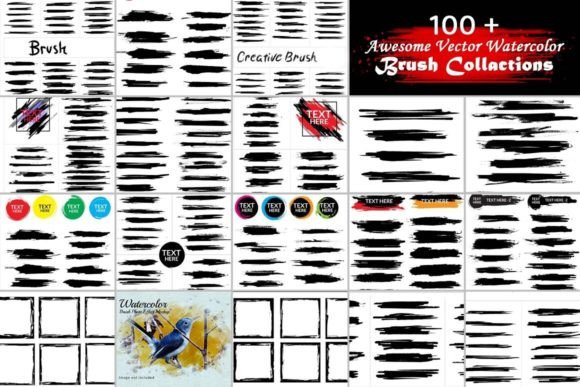
Unlike raster-based watercolor brushes found in Photoshop or Procreate, which rely on pixel manipulation to create texture, vector watercolor brushes operate within software like Adobe Illustrator. They utilize mathematical paths to define shapes, strokes, and patterns. A typical collection includes over 100 distinct brush files, ranging from delicate washes to bold, textured strokes. These brushes are often available in high-definition formats, such as 300 DPI, with dimensions like 1820 pixels by 1200 pixels, ensuring clarity at various scales.
The core mechanism involves applying a brush definition to a path. When a user draws a line, the software repeats or distorts the brush tip along that path. Advanced collections may include "artificial" looks for stylized effects or "natural" looks that mimic the irregular edges and pigment pooling of real paper. The ability to set these brushes easily allows for freehand customization, giving the artist control over pressure sensitivity and flow simulation, provided the software supports dynamic attributes.
Why Designers Seek Vector Watercolor Assets
The primary motivation for utilizing a Vector Watercolor Brush Collection is the desire to achieve an artistic aesthetic while maintaining the technical advantages of vector graphics. Designers often face a trade-off between the rich, unpredictable texture of traditional paint and the clean, editable nature of vector art. These collections attempt to resolve this conflict.
- Scalability: One of the most significant reasons to choose vector brushes is the ability to scale artwork infinitely without loss of quality. This is crucial for print designs, large-format signage, and web projects where resolution requirements vary widely.
- Editability: Because the strokes are vectors, individual elements can be modified after creation. Colors can be changed globally, paths can be reshaped, and layers can be reorganized without degrading the image integrity.
- Workflow Efficiency: Creating realistic watercolor textures from scratch using only basic pen tools is time-consuming. A comprehensive library of 100+ brushes provides immediate access to varied textures, allowing illustrators to focus on composition and color theory rather than technical execution.
Benefits and Practical Applications
When integrated into a project, these brushes can significantly elevate the visual depth of a design. They are particularly effective for creating backgrounds, decorative elements, and standalone illustrations. The variety within a collection—spanning from soft gradients to hard-edged splatters—enables artists to build complex compositions with a cohesive look.
For graphic designers working on branding, the organic feel of watercolor can humanize a brand identity, making it appear more approachable and creative. In web design, these textures can add subtle interest to landing pages without the heavy file sizes associated with high-resolution raster images. Furthermore, the inclusion of both artificial and natural styles offers versatility; a designer might use a natural brush for a botanical illustration and a more stylized, artificial brush for a modern poster design.
Tradeoffs and Considerations
While Vector Watercolor Brush Collections offer distinct advantages, they are not without limitations. It is important to evaluate whether the output aligns with the specific goals of a project.
The Simulation vs. Reality Gap: Despite advancements in technology, vector brushes simulate the look of watercolor rather than replicating the physical interaction of pigment and water. True watercolor relies on the randomness of drying times, paper grain, and gravity. Vector brushes follow algorithmic rules, which can sometimes result in a repetitive or "too perfect" appearance if not used carefully. Artists must understand how to randomize stroke weight, rotation, and spacing to avoid a mechanical look.
Software Dependency: These brushes are primarily designed for vector software like Adobe Illustrator. They do not function natively in raster-based applications unless converted to pixels, which negates the scalability benefit. Additionally, the complexity of the brush definitions can sometimes slow down performance in older machines when rendering intricate paths.
Learning Curve: While the brushes are described as easy to set up, mastering them requires familiarity with vector tools. Achieving a truly convincing effect often demands knowledge of blending modes, opacity settings, and path distortion techniques. Simply applying a brush does not guarantee a professional result; the artist's skill in manipulating the tool remains paramount.
Situations Where Vector Brushes Are a Strong Fit
These collections are an excellent choice for specific scenarios where flexibility and scalability are prioritized. They are ideal for:
- Print Production: Projects requiring large-scale printing, such as banners, posters, or packaging, benefit immensely from the resolution independence of vector files.
- Logo and Icon Design: When a brand needs a hand-painted aesthetic but requires a logo that must remain crisp at any size, vector watercolor brushes provide a viable solution.
- Web Graphics: For websites needing lightweight yet visually rich assets, vector SVG files generated from these brushes load faster than their raster counterparts.
- Iterative Design Processes: If a client frequently requests changes to colors or shapes, the non-destructive nature of vector editing makes these brushes far more efficient than raster alternatives.
When Alternatives May Be Preferable
There are instances where a Vector Watercolor Brush Collection may not be the optimal tool. If the project demands photorealistic representation of watercolor on textured paper, a raster-based approach using a tablet and specialized software (like Corel Painter or Procreate) will yield superior results. Raster brushes capture the granular detail of paper and the chaotic behavior of wet ink more authentically than vector simulations.
Additionally, if the final output is strictly for small-screen digital display and does not require scaling, the extra effort of managing vector paths may be unnecessary. In such cases, high-quality raster brushes or stock photography of actual watercolor paintings might offer a faster workflow with a more authentic texture.
Making an Informed Decision
Deciding whether to invest time in learning and implementing a Vector Watercolor Brush Collection depends on the specific constraints of your project. Evaluate your need for scalability against your desire for textural realism. If your work involves frequent resizing, color adjustments, or integration into complex layouts, the vector format offers undeniable utility. However, if the primary goal is to capture the raw, unpredictable beauty of traditional media for a fixed-size medium, exploring raster alternatives may be more appropriate.
Ultimately, these collections serve as powerful tools within a broader design toolkit. By understanding their mechanics and limitations, artists can leverage the charm of watercolor while retaining the precision and flexibility required in modern digital workflows. Whether you are creating intricate illustrations or simple background textures, a well-curated set of vector brushes can expand your creative possibilities, provided they are applied with intention and technical awareness.