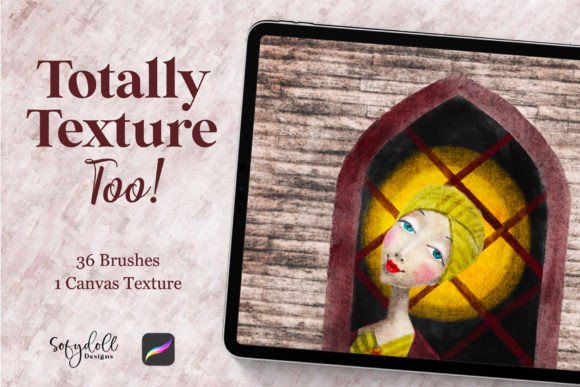
Totally Texture Too for Procreate
Digital art often struggles with a specific problem: it can feel too smooth. The sleek lines and perfect gradients of a tablet screen sometimes lack the grit, grain, and tactile history that traditional media possesses. Totally Texture Too for Procreate addresses this gap directly by introducing a suite of tools designed to bring physical depth back into the digital workflow. This collection is not just about adding noise; it is about fundamentally changing how light interacts with your digital strokes, offering 34 distinct texture brushes, two specialized blender brushes, and a dedicated texture canvas.
For anyone who has ever felt their digital work looked "flat" despite good composition, this set offers a practical solution. It bridges the divide between the convenience of digital creation and the organic chaos of paper, canvas, and ink. Whether you are sketching a quick concept or rendering a final illustration, the ability to control surface friction and absorption digitally can transform the mood of an entire piece.
The Core Components of the Set
At its heart, Totally Texture Too for Procreate is a comprehensive toolkit. The primary value lies in the 34 fun, texture brushes included. These are not merely variations of opacity; they simulate different physical interactions. Some mimic the dry crackle of watercolor on rough paper, while others replicate the heavy impasto of oil paint or the scratchy resistance of charcoal on sandpaper.
Beyond the standard brushes, the inclusion of two blender brushes is significant. Blending in digital art can often result in muddy colors if not handled carefully. These specific blenders are tuned to work harmoniously with the textured brushes, allowing artists to soften edges without destroying the underlying grain. This ensures that the texture remains visible even when colors are merged, preserving the illusion of a physical medium.
The third component, the included texture canvas, serves as a foundational layer. Instead of starting on a pristine white background, users can apply this canvas to instantly give their artwork a base layer of complexity. This approach saves time and ensures consistency across different projects, as every stroke will interact with the same pre-defined surface characteristics.
Perspectives for Beginners and Hobbyists
For those new to digital art, the transition from physical to digital can be jarring. Beginners often struggle to make their drawings look like anything other than vector graphics. Totally Texture Too for Procreate acts as a learning aid by removing the technical barrier to creating complex surfaces. A beginner does not need to master advanced layer blending modes or import external paper scans to achieve a realistic look; the brushes handle the heavy lifting.
Hobbyists, who may prioritize enjoyment over commercial output, find immense value in the "fun" aspect of these tools. The variety allows for experimentation without the fear of ruining expensive physical supplies. If a stroke goes wrong, it can be erased instantly, but the texture remains consistent with the rest of the piece. This encourages playfulness, allowing users to explore styles like mixed media or grunge art that might otherwise require a messy studio setup.
- Ease of Use: The brushes are ready to use immediately upon installation, requiring no complex configuration.
- Creative Freedom: Users can switch between textures rapidly to see which best suits their artistic vision.
- Cost Efficiency: One purchase replaces the need to buy multiple packs of single-use brushes or scan personal paper collections.
Utility for Professionals and Creators
Professional illustrators and designers operate under different constraints, where speed, reliability, and client expectations are paramount. For a professional, Totally Texture Too for Procreate is less about learning and more about efficiency and quality control. The ability to quickly add a unified textural language to a project can elevate a presentation from a draft to a polished deliverable.
Consider a character designer working on a fantasy novel cover. They need the hero's armor to look worn and scratched, and the background to feel ancient and dusty. Using standard brushes, achieving this level of detail requires hours of manual masking and painting. With the 34 texture brushes, the artist can apply these effects in minutes, maintaining a consistent style throughout the piece. The two blender brushes further assist in integrating these textures seamlessly with lighting effects, ensuring the final image holds up under close inspection.
Freelancers and small business owners also benefit from the flexibility these tools offer. When pitching ideas to clients, having a library of textures allows for rapid prototyping of different moods. A marketer creating social media assets might use the gritty textures to convey a raw, authentic brand voice, while an educator designing course materials might use softer, paper-like textures to make content feel more approachable and human.
Key Priorities for Working Artists
When evaluating this toolset, professionals focus on specific metrics that impact their workflow:
- Consistency: The brushes must behave predictably across different devices and zoom levels.
- Integration: The textures must blend well with other Procreate features, such as adjustment layers and photo filters.
- Commercial Value: The unique look provided by these brushes helps differentiate a creator's portfolio in a saturated market.
- Speed: The ability to apply complex effects quickly is essential for meeting tight deadlines.
Educators and Content Creators
Art educators face the challenge of teaching texture and materiality on a flat screen. Totally Texture Too for Procreate provides a tangible way to demonstrate how different surfaces affect mark-making. Teachers can show students the difference between a smooth stroke and one that catches on a rough surface, all within a controlled digital environment. This visual feedback loop is crucial for helping students understand the principles of traditional media before they ever pick up a real brush.
Bloggers and publishers who create visual content for articles also find utility here. In an era where stock photos dominate the web, original illustrations with rich textures stand out. A travel blogger might use the set to create hand-drawn maps that feel vintage and adventurous, or a lifestyle blogger might use them to frame quotes in a way that feels warm and inviting. The texture canvas is particularly useful here, providing a consistent background aesthetic that reinforces a brand's visual identity.
Determining Fit for Your Goals
Is Totally Texture Too for Procreate the right choice for you? The answer depends largely on your current workflow and what you hope to achieve. If you are already satisfied with clean, vector-style art, this set may not be necessary. However, if you find yourself constantly searching for ways to add warmth, grit, or realism to your digital files, this collection addresses that specific need.
Beginners should consider whether they want to focus on mastering the basics of drawing first or if they want immediate access to advanced texturing effects. While the latter can be exciting, it is important to remember that texture enhances a drawing; it does not fix poor anatomy or composition. Conversely, experienced users looking to expand their stylistic range will likely find the 34 brushes provide enough variety to experiment with new genres without needing to invest in new hardware or software.
Ultimately, the value of this toolset lies in its versatility. It serves as a bridge between the precision of the digital world and the imperfection of the physical one. By offering a robust selection of brushes and a dedicated canvas, it empowers creators to produce work that feels alive, tactile, and deeply engaging. Whether you are crafting a personal hobby project, teaching a class, or delivering high-end commercial art, the ability to control texture is a fundamental skill that elevates the final result.