Evaluating the Woven Basket Procreate Texture Brush Set for Digital Fashion Illustration
In the realm of digital fashion illustration, the choice of texture often defines the realism and aesthetic appeal of a design. Artists frequently struggle to replicate the tactile quality of woven materials, such as straw, braid, or pleated fabric, using standard smooth brushes. The Woven Basket Procreate Texture Brush Set addresses this specific challenge by offering a curated collection of monoline tools designed to simulate intricate surface details without requiring complex layering techniques. For professionals and hobbyists working within the Procreate ecosystem on iPad or iPad Pro, understanding the utility, limitations, and comparative advantages of this specific brush pack is essential for building an efficient workflow.
Understanding the Monoline Approach in Fabric Rendering
The core distinction of the Woven Basket Procreate Texture Brush Set lies in its technical construction. Unlike many standard texture brushes that rely on pressure sensitivity to vary line weight, this pack utilizes a strict monoline approach. This means every stroke maintains a consistent width regardless of how hard the stylus presses against the screen. While this might seem restrictive at first glance, it offers significant benefits for rendering specific types of textiles.
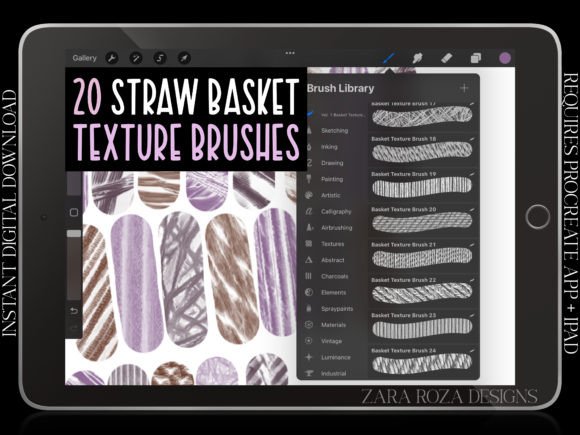
Fabric textures like basket weave, straw hats, or tightly braided belts require uniformity. When drawing a wicker bag or a textured sweater, varying line thickness can inadvertently distort the pattern, making the material look inconsistent. The 20 primary monoline brushes in this set provide a crisp edge with even opacity, allowing artists to lay down repetitive patterns with precision. This consistency is particularly valuable when sketching outfits where the texture must remain distinct from the underlying form of the character or garment.
Additionally, the set includes 9 extra brushes that expand the utility beyond simple weaves. These additions cover elements like threads, plain fabrics, and pleats, creating a comprehensive toolkit for outfit detailing. By consolidating these 30 textures into a single .brushset file, the resource streamlines the process of switching between different material effects during a single illustration session.
Comparing Monoline Textures Versus Pressure-Sensitive Alternatives
When evaluating digital art resources, it is crucial to compare the Woven Basket Procreate Texture Brush Set against more traditional, pressure-sensitive texture options. Most general-purpose texture brushes are designed to mimic natural media like charcoal, watercolor, or dry brush, where line variation adds depth and organic feel. However, for technical fashion illustration, especially in styles like manga, anime, or chibi, the goal is often clarity and stylization rather than photorealism.
Pressure-sensitive brushes can be unpredictable when attempting to create tight, repeating patterns. A slight variation in hand pressure can break the rhythm of a woven texture, requiring time-consuming corrections. In contrast, the one-width nature of the brushes in this set ensures that the artist controls the density of the texture solely through the spacing and overlap of strokes. This makes the toolset superior for:
- Pattern Consistency: Maintaining a regular grid for baskets, bags, or scarves.
- Speed: Rapidly filling areas with texture without worrying about line weight fluctuations.
- Clean Lines: Achieving the sharp, defined edges typical of comic book and cartoon aesthetics.
However, this does not mean pressure-sensitive brushes are obsolete. For rendering soft drapes, flowing silk, or heavy folds where shadow and light transition smoothly, a variable-width brush is often necessary. Therefore, the Woven Basket Procreate Texture Brush Set should be viewed as a specialized supplement to a broader library, rather than a complete replacement for all texturing needs.
Practical Applications in Character and Outfit Design
The versatility of this brush pack extends across various artistic disciplines, from fan art to professional portfolio work. The inclusion of specific textures for items like jackets, sweaters, shirts, pants, dresses, and accessories makes it highly relevant for character designers. Let us consider a few realistic scenarios where this toolset excels.
Accessories and Props: One of the most common challenges in character art is detailing accessories without overcomplicating the composition. Drawing a straw hat, a woven belt, or a textured handbag can take minutes with standard brushes. With the dedicated straw and braid brushes in this set, an artist can apply the texture in seconds. The crisp edges ensure these elements pop against smoother skin tones or solid-colored clothing.
Fashion Sketching: For fashion illustrators, the ability to quickly convey material type is vital. A client may need to see the difference between a cotton shirt and a wool sweater instantly. The "thread" and "pleat" brushes allow for rapid differentiation. The flat, uniform opacity helps maintain the focus on the silhouette and cut of the garment, which is often the priority in fashion flats and croquis.
Stylized Art Styles: In genres like anime, manga, and chibi, details are often exaggerated or simplified. The clean lines provided by these monoline brushes align perfectly with these styles. They avoid the muddy or messy appearance that can occur when trying to force organic textures onto highly stylized characters. Whether drawing socks, shoes, or hats, the result remains clean and legible.
Workflow Integration and Technical Considerations
From a technical standpoint, the format of the Woven Basket Procreate Texture Brush Set is designed for immediate usability. Delivered as a single .brushset file, it requires no complex installation procedures beyond importing it into the Procreate app. This instant digital download eliminates shipping delays and physical waste, fitting seamlessly into the modern digital artist's workflow.
It is important to note the hardware requirements. These brushes are optimized for the Procreate app on iPad and iPad Pro devices. Users relying on desktop software like Photoshop or Clip Studio Paint will need to seek alternative formats, as the .brushset file is proprietary to Procreate. Furthermore, while the brushes offer high-quality textures, they do not replace the fundamental skills of observation and anatomy. The tool facilitates the application of texture, but the artist must still understand how light interacts with the woven material to create a convincing three-dimensional effect.
The lack of pressure sensitivity also means that users cannot rely on the brush to automatically create shading based on stroke intensity. Instead, artists must use layer blending modes or separate shading layers to add depth to the textured areas. This tradeoff—sacrificing automatic variation for manual control—is a deliberate design choice that favors precision over automation.
Decision Factors: Is This Set Right for Your Needs?
Determining whether to integrate the Woven Basket Procreate Texture Brush Set into your toolkit depends on your specific artistic goals and current limitations. Here are key factors to consider before downloading.
Choose this set if:
- You frequently illustrate characters wearing textured clothing like knits, wovens, or straw accessories.
- You work in a stylized medium (manga, comics, cartoons) where clean, uniform lines are preferred.
- You want to speed up your workflow by having pre-made textures for common outfit elements.
- You are comfortable using monoline brushes and managing opacity through layer settings rather than pressure sensitivity.
Consider alternatives if:
- Your primary focus is hyper-realistic portraiture where subtle, organic texture variations are critical.
- You prefer brushes that react dynamically to stylus pressure for shading and texturing simultaneously.
- You work outside the Apple/iPad ecosystem, as this file is exclusive to Procreate.
- You already possess a robust library of custom-made brushes that cover similar ground.
Final Thoughts on Resource Selection
The landscape of digital art resources is vast, and selecting the right tools requires a clear understanding of one's own style and technical requirements. The Woven Basket Procreate Texture Brush Set occupies a specific niche: providing reliable, crisp, and uniform textures for fashion and character illustration. It solves the problem of inconsistent pattern application and offers a time-saving solution for detailing outfits, accessories, and props.
While it may not replace the need for versatile, pressure-sensitive brushes in all contexts, its specialized nature makes it a valuable asset for artists focusing on clothing design, anime, and stylized character art. By understanding its strengths in monoline consistency and its limitations regarding dynamic shading, artists can make an informed decision on whether this digital file enhances their creative process. Ultimately, the value of any brush set lies not just in the number of brushes included, but in how effectively they enable the artist to translate their vision onto the screen with clarity and confidence.