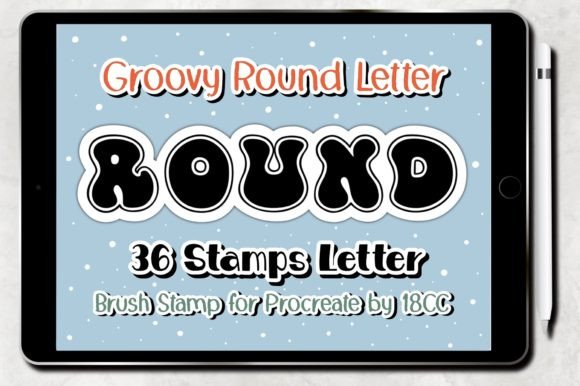
Groovy Round Letter Procreate Stamp Guide
Digital lettering has become an essential skill for modern creators, yet mastering hand-lettering techniques can take years of practice. The Groovy Round Letter Procreate Stamp offers a practical solution for artists who want to achieve professional typography results without the steep learning curve. This specialized brush set allows users to instantly place perfectly formed, rounded letters onto their canvas, bridging the gap between design software and traditional calligraphy.
Whether you are designing a wedding invitation, creating social media graphics, or building custom patterns for fabric, this tool streamlines your workflow significantly. By using pre-made stamps, you bypass the tedious process of drawing each character from scratch while maintaining full control over color, size, and placement. It is an efficient way to add personality to your projects while saving valuable time.
What Makes This Brush Set Unique?
The core appeal of the Groovy Round Letter Procreate Brush Stamp lies in its versatility and ease of use. Unlike standard text tools that rely on system fonts, these brushes capture the organic feel of hand-drawn lettering. Each stroke retains the texture and imperfections that make digital art feel warm and authentic. The "groovy" style specifically refers to a retro-inspired, rounded aesthetic that adds a playful and nostalgic touch to any design.
This collection includes 36 distinct stamps, covering the entire alphabet and essential punctuation marks. Having a complete set ensures that you can write words, short phrases, or even sentences without switching tools. The roundness of the letters makes them particularly forgiving and friendly, which is why they work exceptionally well for branding, greeting cards, and educational materials. Instead of wrestling with vector curves, you simply tap or drag to stamp your desired text, making the creative process fluid and enjoyable.
Practical Applications for Creators
The utility of this brush set extends far beyond simple doodling. For small business owners and entrepreneurs, time is a critical resource. Creating custom packaging labels, product tags, or promotional flyers often requires unique typography. With the Groovy Round Letter Procreate Stamp, you can generate one-of-a-kind designs in minutes. This capability allows freelancers to offer personalized services to clients without investing hours into manual illustration.
Pattern designers also benefit immensely from this tool. Repeating patterns require consistency, and manually drawing identical letters can be challenging. These stamps ensure uniformity across large canvases. You can create seamless textures for wrapping paper, textile prints, or website backgrounds by arranging the letters in rhythmic sequences. The ability to rotate, resize, and recolor each stamp gives you infinite possibilities for layout experimentation.
Educators and content creators find these brushes useful for making engaging visual aids. When creating worksheets, flashcards, or presentation slides, the friendly font style captures attention better than rigid, standard typefaces. Bloggers and marketers can use these assets to craft eye-catching headers or quote graphics for Instagram and Pinterest, ensuring their content stands out in crowded feeds.
How to Install and Use Your Brushes
Getting started with the Groovy Round Letter Procreate Stamp is straightforward, provided you have the necessary hardware and software. The package arrives as a ZIP file containing a single .brushset file. To begin, download the file to your iPad. Once downloaded, locate the file in your Files app and tap on it to unzip if necessary.
Next, look for the "Open In" option within the file menu. Select Procreate from the list of available apps. If done correctly, the application will launch, and the brush set will automatically install into your library. You do not need to navigate complex menus or import individual files; the process is designed to be instant. Once installed, open your Brush Library in Procreate, and you will see a new folder dedicated to these 36 stamps.
To use them, select the brush from the library, choose your preferred color, and simply tap the screen where you want a letter to appear. Because these are stamps, they are pressure-sensitive in terms of opacity but maintain their shape regardless of how hard you press. This feature allows for consistent lettering even if your hand movement varies.
System Requirements and Compatibility
Before purchasing or downloading, it is crucial to verify that your device meets the specific requirements. These brushes are optimized exclusively for the Procreate application on iOS devices. They will not function in other digital art software like Adobe Fresco, Clip Studio Paint, or desktop applications.
You will need an iPad Pro or a standard iPad to run the software effectively. Additionally, while you can use your finger, the experience is significantly enhanced with an Apple Pencil or a compatible, pressure-sensitive stylus. This hardware allows for finer control when positioning the stamps and adjusting layer opacity. Ensure your Procreate version is 5.0 or higher to guarantee full compatibility with the brush engine. Older versions may not support the specific settings embedded in the .brushset file.
Why Choose Stamps Over Standard Fonts?
Many beginners wonder why they should use a stamp set instead of the built-in text tool in Procreate. The primary advantage is artistic freedom. System fonts are static; they lack the texture, grain, and slight irregularities that give hand-lettering its charm. The Groovy Round Letter Procreate Brush Stamp mimics the look of ink on paper, adding depth and character that digital fonts often miss.
Furthermore, stamps allow for creative manipulation that text layers restrict. You can distort, warp, or blend the stamped letters with other painting effects to create unique visual styles. If you are working on a project that requires a cohesive, handmade aesthetic, these brushes provide a level of customization that standard typography cannot match. They empower you to treat letters as illustrations rather than just data.
Maximizing Your Creative Workflow
To get the most out of this set, consider experimenting with layer blending modes. Try setting your letter layer to "Multiply" or "Overlay" to integrate the text seamlessly with textured backgrounds. You can also group multiple stamps together to create custom logos or monograms. Since the file contains all 36 characters, you have the flexibility to spell out anything from short names to motivational quotes.
Remember that the goal of using tools like the Groovy Round Letter Procreate Stamp is to enhance your creativity, not limit it. While they save time, they still require an eye for design. Pay attention to spacing, alignment, and color harmony to ensure your final composition looks polished. By combining these efficient tools with your own artistic vision, you can produce high-quality work that feels both professional and personal.
Ultimately, this brush set is more than just a collection of digital stamps; it is a productivity booster for anyone looking to elevate their graphic design skills. Whether you are a hobbyist exploring new techniques or a professional needing quick turnaround times, the ease of use and stylistic appeal of these groovy round letters make them an invaluable addition to your digital toolkit.