Confetti Procreate Brush Set: Add Color to Your Art
Digital illustration often benefits from a touch of spontaneity that rigid vector lines cannot replicate. For artists, designers, and content creators working within the Apple ecosystem, finding tools that bridge the gap between structured design and playful expression is essential. The Confetti Procreate Brush Set offers exactly this kind of dynamic energy. It is not merely a collection of static shapes but a versatile toolkit designed to inject vibrancy and movement into digital canvases instantly.
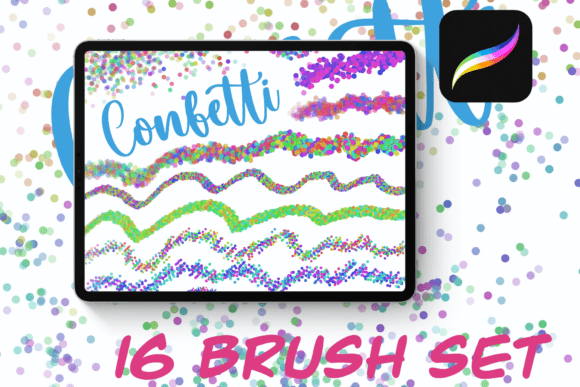
This specific brush pack stands out because it moves beyond simple texture overlays. It provides sixteen distinct brushes, each engineered with unique color-change aspects. This feature allows for organic variation in every stroke, mimicking the chaotic beauty of real-world confetti without the mess. Whether you are a professional graphic designer refining a brand campaign or an educator creating engaging visual aids, these tools streamline the process of adding celebratory elements to your work.
The Core Mechanics of Dynamic Digital Confetti
Understanding how the Confetti Procreate Brush Set functions is key to unlocking its full potential. Unlike standard scatter brushes that might repeat the same image in the same orientation, this set utilizes advanced engine settings to create variety. The "color change" aspect mentioned in its description is particularly powerful. Instead of manually selecting a new hue for every piece of confetti, the brush automatically cycles through a palette as you drag your stylus across the screen.
This automation saves significant time during the creative process. When designing a party invitation, a social media graphic, or a children's book illustration, the need for multi-colored accents is common. Manually painting individual pieces would be tedious and likely result in a uniform look. With these sixteen brushes, the software handles the randomness, ensuring that no two strokes look identical. The result is a natural, scattered appearance that feels hand-crafted rather than digitally generated.
It is important to note the technical requirements for using this tool effectively. The Confetti Procreate Brush Set is exclusive to iPad devices running the latest version of Procreate. This compatibility ensures that users have access to the most recent rendering engines and pressure sensitivity features. If you are using an older tablet or a different drawing application, these specific brushes will not function. Ensuring your software is up to date is the first step toward a seamless workflow.
Practical Applications Across Industries
The utility of this brush set extends far beyond simple party planning. Its applications span various professional and personal domains where visual engagement is critical.
- Brand Marketing and Social Media: Marketers often struggle to make promotional posts stand out in crowded feeds. Using the Confetti Procreate Brush Set to frame product announcements or celebrate milestones can increase click-through rates by adding a sense of urgency and excitement.
- Lettering and Typography: Calligraphers and lettering artists can use these brushes to accentuate headlines. By scattering confetti around bold text, the composition gains depth and dimension, guiding the viewer's eye to the most important message.
- Educational Materials: Teachers and instructional designers can incorporate these brushes into worksheets, slide decks, and digital textbooks. A splash of color makes learning materials more approachable for students of all ages, breaking up dense text with visual interest.
- Freelance Design Projects: Freelancers offering services like logo design or web graphics can use these assets to offer premium variations of their packages. Adding a custom confetti effect to a client's logo presentation adds a layer of polish that justifies higher pricing tiers.
Enhancing Workflow Efficiency and Creativity
In a fast-paced creative environment, efficiency is just as valuable as artistic skill. The Confetti Procreate Brush Set addresses the bottleneck of repetitive detailing. By having sixteen pre-configured options, you can quickly test different styles without spending hours configuring brush settings from scratch. Some brushes may produce fine, dust-like particles, while others might create larger, paper-cut style shapes. This variety allows for rapid prototyping of designs.
Furthermore, the psychological impact of color on user experience cannot be overstated. In commercial environments, bright, varied colors trigger positive emotional responses. When applied correctly, these brushes transform a flat, sterile layout into an inviting space. For instance, a blog post about summer travel tips becomes significantly more engaging when illustrated with colorful, scattered accents that evoke the feeling of a festival or beach day.
However, restraint is necessary. While the temptation is to fill the entire canvas with confetti, the most effective designs use these elements strategically. Overuse can lead to visual clutter, distracting from the core message. Professional artists recommend using the Confetti Procreate Brush Set to highlight focal points or frame edges rather than covering the entire composition. This approach maintains readability while still delivering the intended festive vibe.
Strategic Implementation Tips
To get the most out of this resource, consider integrating it into your existing layer management strategies. Create a dedicated layer for your confetti effects. This allows you to adjust opacity, blend modes, and position independently from your main artwork. If the colors clash with your background, you can easily lower the opacity or switch the blend mode to "Multiply" or "Overlay" to achieve better integration.
Additionally, take advantage of the selection tools in Procreate. You can mask areas where you do not want confetti to appear, ensuring that text remains perfectly legible. This level of control transforms a fun, random brush set into a precise design instrument. For entrepreneurs building a personal brand, consistency is key; saving these configurations as part of your standard project templates ensures that your visual identity remains cohesive across all platforms.
Ultimately, the value of the Confetti Procreate Brush Set lies in its ability to democratize complex texturing. It removes the technical barrier for adding high-quality, colorful details to digital art. Whether you are a seasoned illustrator looking to speed up your process or a business owner trying to make your marketing materials pop, these brushes provide a reliable solution. By combining the power of modern iPad hardware with intuitive brush dynamics, you can elevate your projects with minimal effort and maximum impact.