Neon Element Brush Stamps for Procreate: A Creator's Guide
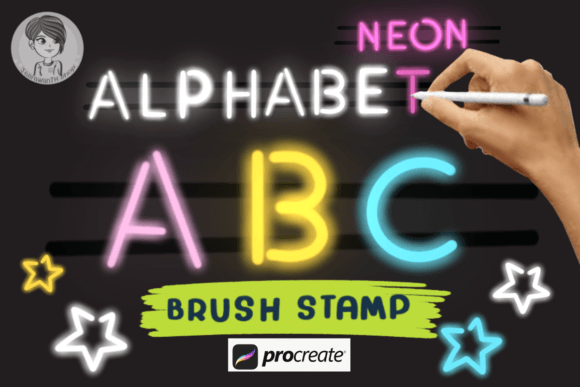
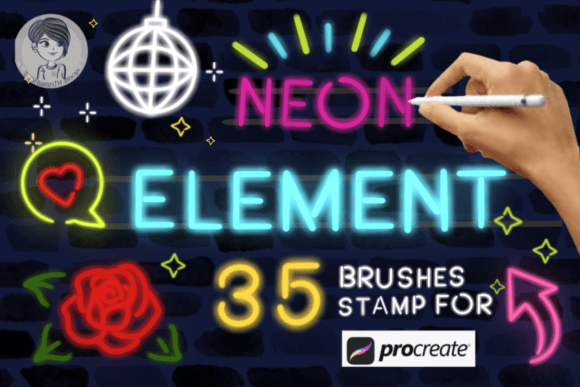
In the rapidly evolving landscape of digital art, efficiency and aesthetic impact often go hand in hand. For artists working within the Procreate ecosystem on iPad, finding tools that balance speed with visual flair is essential. Enter the Neon Element Brush Stamps for Procreate, a specialized collection designed to inject vibrant energy into digital illustrations. This set includes 35 distinct neon element brush stamps, offering a versatile toolkit for anyone looking to elevate their graphic design, digital drawing, or personal projects without starting from scratch.
Unlike traditional brushes that require complex stroke manipulation to achieve a specific shape, these stamps function as pre-defined elements. They allow you to place intricate neon designs with a single tap. However, they are far from static assets. The true power of this set lies in its adaptability, allowing users to adjust color, opacity, and brightness to ensure the artwork glows exactly as intended. Whether you are a professional designer creating marketing materials or a hobbyist exploring cyberpunk aesthetics, understanding how to leverage these tools can significantly streamline your workflow.
The Core Concept: Efficiency Meets Vibrancy
At its heart, the Neon Element Brush Stamps for Procreate addresses a common challenge in digital illustration: the time-consuming process of manually rendering glowing, futuristic elements. Creating realistic neon tubes, signs, or abstract light effects from scratch requires layering multiple colors, adjusting blend modes, and meticulously refining edges. With this brush set, those steps are condensed into a single action.
The collection features 35 unique stamps, each representing a different aspect of neon culture. From curved tubes and geometric shapes to text-like structures and abstract bursts of light, the variety ensures that there is a stamp suitable for almost any composition. These are not merely images pasted onto a canvas; they are dynamic brushes integrated directly into the Procreate engine. This integration means they respond to pressure sensitivity (if configured), rotation, and size adjustments just like any other native tool, providing a seamless drawing experience.
Customization: Making the Neon Yours
One of the most significant advantages of using the Neon Element Brush Stamps for Procreate is the level of control offered over the final output. While the base shapes are predefined, the visual outcome is entirely up to the artist. The default settings provide a solid foundation, but the real magic happens when you begin to tweak the parameters.
- Color Adjustment: You are not limited to the preset hues. By changing the active color in Procreate before stamping, you can transform a standard blue tube into a hot pink glow or a deep violet arc instantly.
- Opacity Control: Adjusting opacity allows you to create subtle background glows or intense foreground highlights. Lowering the opacity can simulate the diffusion of light through fog or glass, adding depth to your scene.
- Brightness and Blending: To achieve that signature "brighter than before" look, combining these stamps with Procreate's blending modes (such as Additive or Screen) is highly effective. This technique mimics the way real light interacts with surfaces, making the neon elements appear to emit their own illumination.
Furthermore, the size of these brushes has been adjusted to a basic, versatile level right out of the box. This ensures they fit naturally into most compositions without requiring immediate resizing. However, because they are customizable, you can scale them up to dominate a poster or shrink them down to add delicate details to a character's outfit.
Practical Applications Across Industries
The versatility of the Neon Element Brush Stamps for Procreate extends far beyond simple doodling. These tools have practical applications across various creative fields, serving both commercial and personal needs.
Digital Drawing and Illustration
For illustrators focusing on sci-fi, cyberpunk, or urban night scenes, these stamps are invaluable. Imagine drawing a rainy city street at night. Instead of spending hours painting individual streetlights and shop signs, an artist can use the stamps to quickly populate the background with glowing storefronts and traffic signals. This speeds up the sketching phase, allowing more time to focus on lighting, atmosphere, and character expression.
Graphic Design and Branding
Business owners and graphic designers often need eye-catching visuals for social media, advertisements, or merchandise. The bold, high-contrast nature of neon graphics makes them perfect for grabbing attention in crowded digital feeds. Using the 35-element set, a designer can create unique logos, sale banners, or event posters that stand out. The ability to customize the color palette means these assets can easily align with a brand's specific identity while retaining the energetic vibe of neon aesthetics.
Personal Projects and Experimentation
Hobbyists and students also benefit greatly from this resource. Learning how to render light can be difficult, but using these stamps provides a hands-on way to study how light behaves. Artists can experiment with layering different stamps, overlapping them to see how colors mix, and adjusting transparency to understand depth. It serves as both a productivity tool and an educational aid for mastering digital lighting techniques.
Technical Considerations and Limitations
While the Neon Element Brush Stamps for Procreate offer immense value, it is crucial to understand their technical boundaries to manage expectations effectively. The most important limitation to note is platform compatibility.
Exclusivity to Procreate: These stamps are created specifically for use with the Procreate program. They utilize file formats and engine behaviors unique to Procreate on the iPad. Consequently, they will not work with other digital art programs such as Adobe Photoshop, Clip Studio Paint, or Krita. If you are part of a team that works across different software ecosystems, this exclusivity must be factored into your asset management strategy. Attempting to import these files into non-Procreate applications will result in errors or missing data.
Resolution and Scaling: Although the brushes are vector-friendly in behavior due to the nature of Procreate's raster engine, extreme scaling can sometimes affect the crispness of the edges. It is generally best practice to apply these stamps at a size close to their final intended resolution. If a project requires massive enlargement, it may be necessary to refine the edges manually after stamping to maintain a professional finish.
Workflow Integration: Because these are stamps rather than freehand brushes, they rely on placement accuracy. While they save time, they do not replace the need for artistic judgment. An artist must still consider composition, perspective, and context. Placing a neon sign that doesn't match the vanishing point of a room, for example, can break the illusion of realism. Therefore, these tools are best used by artists who already possess a foundational understanding of design principles.
Evaluating Suitability for Your Needs
Before integrating the Neon Element Brush Stamps for Procreate into your workflow, consider your specific project requirements. Ask yourself the following questions to determine if this set is the right fit:
- Is my primary workflow on iPad Procreate? If yes, this set is highly compatible. If you work primarily on desktop, you may need to seek alternative assets.
- Do I need quick, stylized lighting effects? If your goal is rapid prototyping or creating stylized art where photorealism isn't the priority, these stamps are ideal.
- Am I willing to customize the defaults? While the brushes are ready-to-use, achieving the best results requires tweaking color and opacity. If you prefer tools that work perfectly out-of-the-box without adjustment, you might find the customization step tedious.
- Does my project demand a neon or futuristic aesthetic? These brushes are niche. They excel in cyberpunk, nightlife, and modern tech themes but may feel out of place in pastoral or historical settings.
Conclusion: Elevating Digital Artwork
The Neon Element Brush Stamps for Procreate represent a powerful intersection of convenience and creativity. By providing 35 customizable neon elements, they empower artists to create stunning, luminous graphics with unprecedented speed. The ability to adjust color, opacity, and brightness ensures that no two artworks need look the same, fostering genuine originality even when using pre-made assets.
While the limitation to the Procreate environment is a constraint, it also speaks to the quality of the optimization provided for that specific platform. For creators who live in the Procreate app, these stamps are not just a shortcut; they are a catalyst for inspiration. Whether you are designing a logo for a startup, illustrating a concept for a video game, or simply enjoying a night of digital sketching, these brushes offer a reliable way to bring the electric energy of neon to life. By understanding their strengths and limitations, you can harness their full potential to produce artwork that truly shines.