Hand Drawn Arrows - PNG Brush: 101 Creative Stamps
In the crowded landscape of digital design, the difference between a generic template and a standout visual often comes down to texture and personality. Pre-made vector shapes can feel sterile, while hand-crafted elements bring warmth and authenticity. This is where the Hand Drawn Arrows - PNG Brush collection becomes an essential tool for designers seeking to inject character into their work. With a comprehensive set of 101 unique arrows, this resource bridges the gap between manual illustration and digital efficiency, offering high-quality assets that feel organic yet remain perfectly scalable for modern workflows.
The Intersection of Authenticity and Efficiency
Designers and content creators frequently face a dilemma: the desire for a hand-drawn aesthetic versus the time constraints of professional deadlines. Sketching every directional cue by hand in Photoshop or Illustrator is labor-intensive and inconsistent. The Hand Drawn Arrows - PNG Brush solves this by providing a library of pre-rendered, high-resolution graphics that mimic the imperfections of human drawing without the associated time cost.
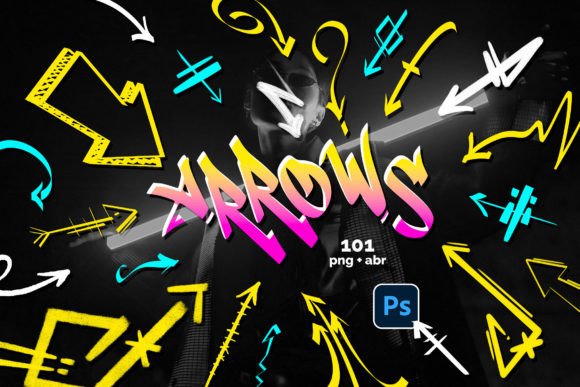
This collection includes 101 distinct arrow designs, each saved as a transparent .PNG file. These files are ready for immediate use in any application that supports image imports. Furthermore, the package includes a dedicated .ABR file containing 101 brush stamps specifically optimized for Adobe Photoshop. This dual-format approach ensures versatility; whether you need a static image element for a presentation or a dynamic stamp for a complex composition, the tools are at your fingertips.
Why Hand-Drawn Elements Matter
The appeal of hand-drawn graphics lies in their psychological impact on the viewer. Unlike rigid geometric lines, hand-drawn arrows suggest movement, guidance, and human interaction. They soften the tone of a document, making information feel more accessible and less corporate. When used strategically, these elements can guide the user's eye through a layout with a sense of flow that feels natural rather than forced. The variety within the 101-arrow set ensures that you can match the specific "voice" of your project, from playful and whimsical to rough and industrial.
Practical Applications Across Industries
The utility of the Hand Drawn Arrows - PNG Brush extends far beyond simple graphic design projects. Its adaptability makes it a valuable asset for educators, marketers, entrepreneurs, and freelancers alike. Here is how different professionals can leverage these assets to enhance their output.
Marketing and Branding
For marketers and business owners, visual consistency is key, but so is engagement. Static infographics often fail to capture attention in a fast-scrolling social media environment. By integrating hand-drawn arrows into marketing materials, brands can create a more inviting atmosphere. Imagine a sales funnel diagram where the progression steps are connected by sketched arrows; it immediately signals a human-centric process rather than a robotic one. These arrows work exceptionally well in call-to-action buttons, guiding users toward conversion points with a friendly nudge.
Education and Presentations
Educators and trainers rely heavily on clear visual communication. Complex concepts often require diagrams to explain relationships between ideas. Standard arrows can look dry and intimidating in lecture slides or educational worksheets. Using the Hand Drawn Arrows - PNG Brush allows teachers to annotate slides dynamically during a live presentation or prepare engaging handouts that students find easier to digest. The informal style reduces cognitive load, making the material feel less like a textbook and more like a collaborative discussion.
Digital Content Creation
Bloggers, publishers, and social media managers constantly produce content that needs to stand out. Whether creating thumbnails for YouTube videos, headers for blog posts, or stories for Instagram, the need for quick, high-quality graphics is constant. The .PNG format allows these arrows to be dropped onto any background without worrying about color matching or transparency issues. For video editors, these static images can be animated slightly to create motion graphics that retain a handcrafted charm.
Technical Features and Workflow Integration
Understanding the technical specifications of the Hand Drawn Arrows - PNG Brush is crucial for maximizing its potential in your workflow. The collection is not just a random assortment of images; it is a structured toolkit designed for seamless integration into industry-standard software.
- High Resolution: All 101 PNG files are rendered at high quality, ensuring they remain crisp even when scaled up for large banners or printed materials.
- Transparency: Each PNG features a transparent background, allowing for easy layering over photos, gradients, or solid colors without unsightly white boxes.
- Photoshop Compatibility: The included .ABR file installs directly into Adobe Photoshop. Once loaded, these brushes appear in the brush panel, ready to be stamped with a single click. You can adjust size, opacity, and flow instantly, just like any other Photoshop brush.
- Variety: With 101 unique designs, the set covers various styles, thicknesses, and orientations, reducing the need to search for external resources mid-project.
Optimizing Your Design Process
Efficiency is a primary driver for adopting such tools. Instead of spending minutes drawing a single directional indicator, a designer can select the perfect arrow from the library in seconds. This speed does not come at the expense of creativity. Because the brushes are available in Photoshop, they can be combined with other effects, masked, clipped, or recolored using adjustment layers. This flexibility means the Hand Drawn Arrows - PNG Brush acts as a starting point for further customization rather than a final, unchangeable asset.
For those working outside of Photoshop, the PNG files offer universal compatibility. They can be imported into Canva, PowerPoint, Keynote, InDesign, and web design platforms. This cross-platform capability ensures that the entire team, regardless of their software preferences, can maintain a consistent visual language across all deliverables.
Strategic Considerations for Implementation
While the Hand Drawn Arrows - PNG Brush offers significant advantages, successful implementation requires thoughtful application. To get the most value from these assets, consider the following practical recommendations.
Maintain Consistency: While there are 101 options, avoid using too many different styles within a single document. Select two or three arrows that complement each other and stick to them throughout your project. This creates a cohesive visual rhythm. Mixing wildly different line weights or sketch styles can make a design look cluttered and unprofessional.
Context Matters: Evaluate the tone of your brand before deploying these arrows. A sleek, minimalist tech startup might find the hand-drawn style too casual, whereas a lifestyle blog, a creative agency, or an educational platform will likely benefit greatly from the organic feel. The goal is alignment between the visual style and the message being conveyed.
Color Customization: Do not limit yourself to the default colors provided in the PNGs. Since these are digital assets, take advantage of your editing software to change the hue to match your brand palette. A red arrow might signal urgency, while a blue one suggests trust; adjusting the color allows you to leverage psychological triggers effectively.
Enhancing User Experience Through Visual Cues
Ultimately, the purpose of an arrow is communication. It directs attention, indicates sequence, and establishes hierarchy. The Hand Drawn Arrows - PNG Brush elevates this function by adding an emotional layer to the directive. Users are more likely to follow a path suggested by a friendly, hand-sketched line than a harsh, mechanical pointer. This subtle shift in user experience can lead to higher engagement rates, better comprehension of complex data, and a stronger connection between the audience and the creator.
Whether you are a freelancer building a portfolio, a marketer crafting a campaign, or an educator preparing a lesson plan, having a reliable set of creative tools is indispensable. The combination of 101 high-quality PNG files and a dedicated Photoshop brush set provides the flexibility and speed needed to execute professional-grade designs without the overhead of custom illustration. By integrating these hand-drawn elements into your workflow, you ensure that your visual communications are not only clear and functional but also memorable and human.