Halloween Stamp Brush for Procreate: Unlocking Spooky Creativity
Digital art has transformed how we approach seasonal creativity, moving away from the constraints of physical media to the limitless possibilities of a tablet. For many artists and hobbyists, the arrival of October brings a specific desire to capture the essence of Halloween—the whimsical, the eerie, and the playful—all within a single digital canvas. This is where a specialized tool like the Halloween Stamp Brush for Procreate becomes an essential asset in your creative toolkit. It is not merely a collection of textures; it is a shortcut to atmosphere, allowing you to build complex scenes with speed and precision.
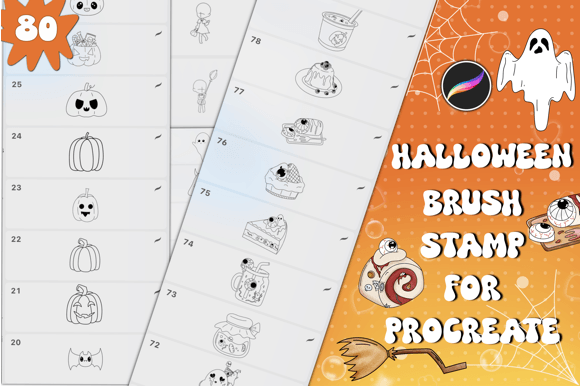
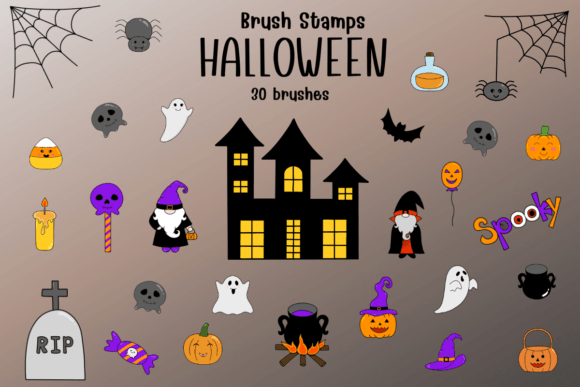
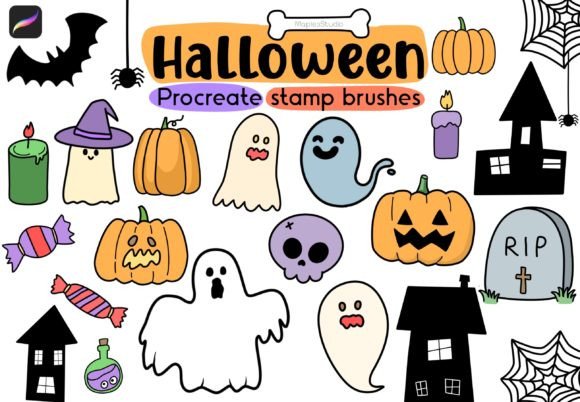
At its core, this resource is a curated set of 28 spooky and whimsical brushes designed specifically for the Procreate application on iPad. Unlike standard drawing brushes that require steady hands and intricate line work to create objects like pumpkins, ghosts, or bats, these are stamp brushes. With a single tap of your stylus, you can place a fully formed element onto your artwork. The set includes a diverse range of imagery, from classic jack-o'-lanterns and cobwebs to more abstract magical elements like floating stars and mystical symbols. Included in the download is a convenient zip file containing 38 star stamp variations alongside the main collection, all packaged in a format ready for immediate import into your Procreate file.
Bringing Seasonal Projects to Life Quickly
The primary advantage of using the Halloween Stamp Brushes for Procreate set lies in efficiency without sacrificing quality. Consider the scenario of a social media manager tasked with creating a week's worth of content for a brand before the holiday rush. Designing unique illustrations from scratch for every post would consume days of work. However, by utilizing these stamp brushes, they can rapidly assemble engaging graphics. A simple background color, a few taps to place a haunted house silhouette, and some scattered pumpkin stamps can result in a professional-looking banner in minutes.
This speed is equally valuable for educators planning classroom activities. Teachers often need visual aids to explain stories about autumn or Halloween traditions. Instead of searching through endless stock photo libraries for images that might be overused or lack a cohesive style, an educator can use these brushes to create custom storyboards or worksheets. They can draw a scene and then "stamp" characters or props directly into the narrative, making the learning material interactive and visually distinct for their students.
Real-World Applications for Creators and Entrepreneurs
- Independent Merchandise Design: Small business owners selling t-shirts, tote bags, or stickers can use these brushes to prototype designs quickly. By arranging different stamps, they can test layouts and compositions before committing to print, ensuring the final product has the right balance of spooky and cute.
- Scrapbooking and Digital Journaling: Hobbyists who enjoy documenting their lives digitally can add a festive touch to their October entries. Stamping a small bat or a witch's hat next to a photo adds a layer of personality that standard text tools cannot achieve.
- Game Asset Creation: Indie game developers often need quick placeholders for UI elements or environmental details. These brushes can serve as temporary assets during the prototyping phase, helping to visualize the game's aesthetic before high-fidelity assets are created.
- Invitation and Card Design: Whether for a personal party or a client project, creating digital invitations is easier when you have a library of thematic elements. You can mix and match the 28 included brushes to create a unique invitation suite that feels hand-crafted rather than templated.
Understanding the Workflow and Compatibility
It is crucial to understand that these tools are built exclusively for the Procreate Application only. If you are working on desktop software like Photoshop or Illustrator, these files will not function as intended. The beauty of Procreate lies in its intuitive interface and seamless integration with the Apple Pencil, which makes the stamping action feel natural and responsive. When you import the provided .brushset file, the brushes appear instantly in your brush library, organized and ready to use.
Before diving into a project, users should consider how these stamps fit into their existing workflow. While they are excellent for adding detail and texture, they work best when combined with other drawing techniques. Relying solely on stamps can sometimes make artwork look repetitive or flat. The most compelling pieces often blend the convenience of the Halloween Stamp Brush for Procreate with hand-drawn shading, lighting effects, and custom coloring. For instance, you might stamp a ghost, but then use a traditional airbrush to add a soft glow around it, integrating it seamlessly into the scene.
Choosing the Right Elements for Your Vision
The collection includes 38 stars stamp brushes alongside the main Halloween themes, offering a versatile palette for different moods. Some projects call for a darker, more mysterious vibe, while others benefit from the whimsical charm of twinkling stars and magical sparkles. Before downloading or purchasing, think about the tone of your project. Are you aiming for a scary horror aesthetic, or a family-friendly celebration? The variety within the set allows you to curate a specific look. You can select the jagged, eerie stars for a haunted forest scene or the softer, glowing ones for a magical fairy tale setting.
Furthermore, consider the resolution and scale of your final output. Since these are vector-like stamps within a raster environment, they generally hold up well when scaled, but it is always wise to test them at your intended size first. A stamp that looks perfect on a phone screen might lose definition if blown up for a large poster. Testing a few brushes on a blank canvas to check their opacity and texture settings is a practical step that can save time later in the editing process.
Maximizing Creative Potential
The true value of the Halloween Stamp Brushes for Procreate set is found in how it empowers users to overcome creative blocks. Sometimes, staring at a blank canvas is the hardest part of the artistic process. Having a library of pre-made elements can jumpstart your imagination. Seeing a cluster of pumpkins or a flying broomstick might inspire a whole new composition you hadn't considered otherwise. It encourages experimentation, allowing you to try out ideas without the pressure of having to draw every leaf and petal perfectly.
For freelancers and publishers, this efficiency translates directly to better time management and increased productivity. In a fast-paced digital market, the ability to deliver high-quality, themed content quickly is a competitive advantage. These brushes provide a foundation upon which you can build unique, branded visuals that stand out in a crowded feed. They allow you to maintain a consistent artistic voice while meeting tight deadlines.
Ultimately, whether you are a seasoned digital artist looking to expand your library or a beginner eager to try your hand at seasonal design, these tools offer a fun and functional way to enhance your work. The inclusion of both spooky and whimsical elements ensures there is something for every type of creator. As you explore the 28 brushes and the additional star variations, remember that the goal is to bring your vision to life with ease and joy. So, open up your Procreate app, import the file, and let your creativity flow into something truly magical. Hope you have fun with these brushes💕 Thank you ✨.