Groovy Gouache for Procreate: Mastering Textured Digital Art
Digital illustration often struggles to replicate the tactile satisfaction of traditional media. While vector tools offer precision and standard airbrushes provide smooth gradients, they frequently lack the organic imperfection that makes art feel alive. For artists transitioning from physical canvases to tablets, or digital natives seeking a more grounded aesthetic, the absence of texture can make work feel sterile. This is where Groovy Gouache for Procreate steps in as a vital resource. It bridges the gap between the pixel-perfect screen and the rich, creamy unpredictability of real gouache paint, offering a solution for those who crave depth without leaving their iPad.
The Challenge of Flat Digital Surfaces
Many adult hobbyists and professional illustrators face a specific hurdle when working in Procreate: the "plastic" look. Even with advanced blending modes, standard brushes can result in artwork that feels too uniform. The goal for most creators is not just to draw lines but to build surfaces that catch light and shadow naturally. When you attempt to mimic traditional gouache—a water-based opaque paint known for its matte finish and vibrant coverage—using default digital tools, the process becomes tedious. You might find yourself manually adding noise, struggling to layer opacity correctly, or spending hours trying to recreate the grainy interaction between pigment and paper.
This friction can stall creativity. If an artist has to fight the software to achieve a desired look, the flow state breaks. The need is clear: a toolset that automates the complexity of texture while maintaining total artistic control. Groovy Gouache for Procreate addresses this by pre-configuring the complex algorithms required to simulate wet-on-dry application, dry brush strokes, and heavy body paint behavior. It removes the technical barrier, allowing you to focus on composition, color theory, and expression rather than tweaking brush settings.
Understanding the Groovy Gouache Experience
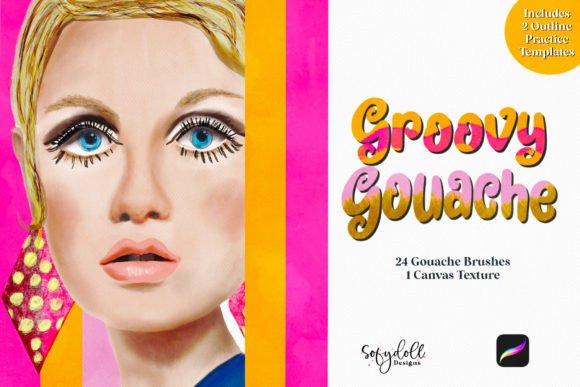
At its core, Groovy Gouache for Procreate is designed to emulate the unique properties of gouache paint. Unlike watercolor, which relies on transparency, gouache is opaque and sits on top of the surface. This allows for bold, flat areas of color that can be layered over one another without muddying the underlying hues. The set includes 24 distinct brushes, each calibrated to handle different aspects of this medium. Some are designed for broad, sweeping washes that lay down solid color, while others mimic the scratchy, textured feel of a dry brush dragged across rough paper.
The true power of this set lies in how it handles opacity and blending. In traditional painting, gouache dries slightly lighter than it appears wet, and layers interact physically. The digital simulation within Groovy Gouache for Procreate captures this nuance. When you apply a stroke, the brush reacts to your pressure and tilt, depositing "paint" that builds up realistically. This means you can create highlights by simply glazing a lighter color over a darker base, achieving a luminosity that is difficult to reach with standard blending tools.
Practical Applications for Diverse Artists
Whether you are a concept artist designing characters, an illustrator creating children's books, or a hobbyist sketching landscapes, the applications for this brush set are vast. For character designers, the ability to create soft, rounded forms with a hint of texture adds immediate volume and personality to figures. The creamy nature of the brushes helps in rendering skin tones that feel warm and human rather than like polished plastic.
Illustrators focusing on editorial work or album covers often benefit from the bold, graphic quality of gouache. The set allows for high-contrast compositions where colors pop against one another. Because the brushes maintain edge integrity while still feeling organic, they are perfect for stylized environments where clean shapes meet textured surfaces. Furthermore, the versatility of the 24 included options means you rarely need to leave the set to find the right tool for a job, streamlining your workflow significantly.
Leveraging Canvas Textures and Sketch Templates
A critical component of achieving a realistic gouache look is the surface upon which you paint. A perfectly white digital canvas can undermine even the best textured brushes. Recognizing this, Groovy Gouache for Procreate includes a dedicated canvas texture. This isn't merely a background image; it is a file designed to interact with the brush engine. When used in conjunction with the brushes, the texture creates a subtle grain that mimics cold-press watercolor paper or heavy cardstock. This interaction gives the digital paint something to "grab" onto, enhancing the illusion of physical pigment sitting on a rough surface.
Beyond the finished product, the learning curve for mastering new techniques can be steep. To support skill development, the set comes with two outline sketch templates. These are invaluable for practice sessions. Instead of staring at a blank page, users can load these templates to practice shading, coloring within lines, and experimenting with layering techniques immediately. For beginners, these outlines provide structure, reducing the anxiety of starting from scratch. For experienced artists, they serve as quick studies to test color palettes or explore different lighting scenarios without the time investment of full conceptualization.
Implementing the Set into Your Workflow
Integrating Groovy Gouache for Procreate into your existing routine is straightforward. Start by importing the brush set into your Procreate app. Once installed, select the accompanying canvas texture and apply it as a background layer. Set this layer to a blending mode like "Multiply" or keep it normal depending on your desired contrast level. Begin with the broader brushes to block in your main shapes and shadows, utilizing the opacity controls to mimic the translucency of wet paint.
As you refine your piece, switch to the finer, more textured brushes to add details and surface interest. The key to success with this set is to embrace the imperfect edges. Do not try to smooth everything out; the charm of gouache lies in its slight irregularities. Use the sketch templates to practice varying your pressure, observing how the brush responds to light versus heavy touches. Over time, you will develop an intuition for how the digital paint behaves, allowing you to paint faster and with greater confidence.
Tailoring the Approach to Your Goals
Different users will approach Groovy Gouache for Procreate based on their specific artistic goals. If your priority is speed and efficiency, you might focus heavily on the larger, smoother brushes to create rapid sketches and mood boards. The opacity and layering capabilities allow for quick iteration, making it ideal for brainstorming sessions. Conversely, if your goal is photorealism or highly detailed illustration, you will likely spend more time exploring the granular textures and fine-line brushes within the set.
For those teaching art or leading workshops, the inclusion of the sketch templates makes this set an excellent educational tool. You can demonstrate specific techniques using the provided outlines, ensuring all students are working from the same foundation while experimenting with the varied brush strokes. Ultimately, whether you are refining a professional portfolio or simply enjoying a creative afternoon, this set provides the necessary tools to elevate your digital art from flat and generic to rich and textured.
By addressing the common frustrations of digital flatness and providing a comprehensive suite of brushes, textures, and practice materials, Groovy Gouache for Procreate empowers artists to reclaim the joy of tactile painting. It transforms the iPad into a genuine studio space, ready for whatever creative project you wish to undertake. Get ready to get your artistic groove on and discover a new dimension in your digital illustrations.